
If you are familiar with Angular development, then you are likely aware of the latest addition to the framework known as Signals. Signals are a new reactive primitive that allows Angular to track changes to its model. In comparison to RxJS, signals offer a simpler and more performant solution that promises to bring several benefits.
- One significant advantage of signals is that they can replace RxJS in most cases, which reduces the complexity of the application. Additionally, Angular can become much more performant with signals because they provide precise models of what has changed. This allows for fine-grained updates to the template rather than dirty-checking the entire application.
- The introduction of the signal component in Angular v17 will make it easier for developers to optimize their code for performance. They will no longer need to worry about concepts like
changeDetectionStrategy,onChangeslifecycle hook, and even pipes to some extent. As a result, it will be more challenging for developers to make mistakes that could negatively affect their application’s performance.
- Signals enable Angular to become a zone-less application. Currently, zone helps Angular to know if something has changed and trigger change detection for the entire application. However, signals provide exact models of what has changed, making it possible for the framework to know precisely which model has been modified.
- Angular offers interoperability with RxJS, thanks to
@angular/core/rxjs-interop, allowing developers to migrate gradually from RxJS to signals. By using thetoSignalfunction, RxJS observables can easily be converted to signals, and using thetoObservable, signals can be converted back to observables. This enables developers to take advantage of signals while still maintaining backward compatibility with RxJS.
Writable Signals
Writable signals provide a way to update their values directly through an API. To create a writable signal, you call the signal function with the initial value of the signal. For instance, you can create a count signal by calling signal(0).
To change the value of a writable signal, you can use the .set() operation to directly set its value to a new one, such as counter.set(2).
Alternatively, you can use the .update() operation to compute a new value from the previous one, such as counter.update(value => value + 1) to increment the count by 1.
If a signal contains an object and you want to make an internal change to that object, you can use the .mutate() method. For example, if a person is a signal containing a person object, you can use person.mutate() to change an internal property in the object. Consider that it will notify the dependency.
Writable signals have the type WritableSignal.
import 'zone.js/dist/zone';
import { Component, effect, signal } from '@angular/core';
import { bootstrapApplication } from '@angular/platform-browser';

@Component({
  selector: 'my-app',
  standalone: true,
  template: `
    <button (click)="setCount()">Change count</button> <button (click)="setName()">Change person</button>
  `,
})

export class App {
  counter = signal(0);
  person = signal({ name: 'Antonio', surname: 'Esposito' });

  constructor() {
    effect(() => console.log('Count:', this.counter()));
    effect(() => console.log('Person: ', this.person()));
  }

  setCount() {
    this.counter.set(2);
    this.counter.update((value) => value + 1);
  }

  setName() {
    this.person.mutate((person) => (person.name = 'Dino'));
  }
}

bootstrapApplication(App);
This is how the standalone component will behave after clicking on the two buttons:

Computed Signals
Computed signals derive their values from other signals and are defined using the computed function, which takes a derivation function as an argument. When a computed signal is read for the first time, its derivation function is executed and the result is cached. Future reads of the signal return the cached value without recalculating it unless any of its dependencies have changed, which invalidates the cached value.
Computed signals are useful for performing computationally expensive operations such as filtering arrays. However, they are not writable signals, so you cannot assign values to them directly. This means that calling the .set() operation on a computed signal results in a compilation error.
import 'zone.js/dist/zone';
import { Component, computed, effect, signal } from '@angular/core';
import { bootstrapApplication } from '@angular/platform-browser';

@Component({
  selector: 'my-app',
  standalone: true,
  template: `
    <button (click)="setCount()">Change count</button>
  `,
})
export class App {
  counter = signal(0);
  computed = computed(() => this.counter() * 100);

  constructor() {
    effect(() => console.log('Count changed:', this.counter()));
    effect(() => console.log('Computed count: ', this.computed()));
  }

  setCount() {
    this.counter.set(2);
    this.computed.set(10); // set is not availble on computed signal
  }
}

bootstrapApplication(App);
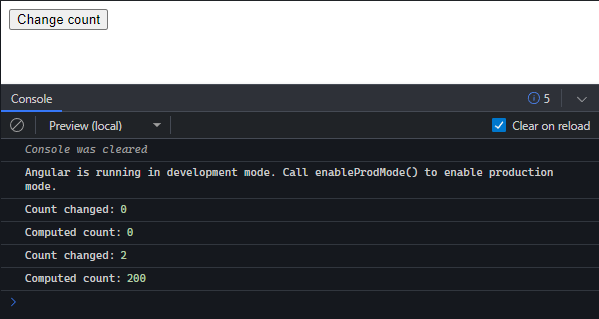
This is how the standalone component will behave after clicking the buttons:
Effects
Signals can alert consumers of changes, triggering an effect. An effect is an operation created using the effect function. It tracks signal value reads and reruns whenever any of them change. Dependencies are dynamically tracked, and only signals read in the most recent execution are included. Effects run at least once and always execute asynchronously during the change detection process.
The effect part of the above mentioned code examples is meant to create effects that run automatically whenever a signal value changes. In the code, there are two effects created in the constructor function. The effects log the signals values using console.log to output the values to the console. The effects will continue to run as long as the component is active and its signals change.
Untrack Signals
Normally, a computed or effect function that reads signals creates a dependency on those signals, but sometimes that’s not what is desired. For example, an effect may want to log a message only when a certain signal changes, without treating other signals as dependencies. In such cases, the untracked function can be used to read a signal without creating a dependency.
import 'zone.js/dist/zone';
import { Component, computed, effect, signal, untracked } from '@angular/core';
import { bootstrapApplication } from '@angular/platform-browser';

@Component({
  selector: 'my-app',
  standalone: true,
  template: `
    <button (click)="setCount()">Change count</button> <button (click)="setName()">Change person</button>
  `,
})
export class App {
  counter = signal(0);
  person = signal({ name: 'Antonio', surname: 'Esposito' });
  computed = computed(() => this.counter() * 100);

  constructor() {
    effect(() =>
      console.log(
        `The counter is ${untracked(this.counter)} and the person is ${
          this.person().name
        }`
      )
    );
  }

  setCount() {
    this.counter.update((value) => value + 1);
  }

  setName() {
    this.person.mutate((person) => (person.name = 'Dino'));
  }
}

bootstrapApplication(App);
This code demonstrates the usage of untracked() to prevent unnecessary dependencies from being created. In this example, the effect() function logs the current value of counter and person. However, person is the only signal that triggers this effect, and counter is only incidentally read. By wrapping this.counter in untracked(), changes to counter won’t trigger the effect, preventing unnecessary logs.
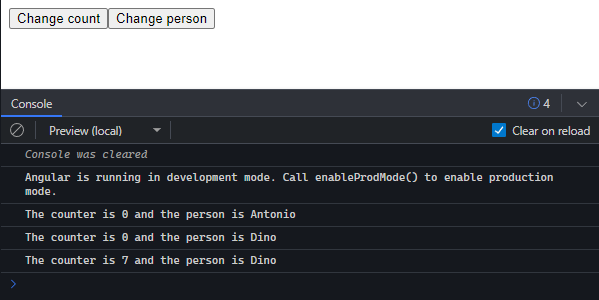
The first line in the console logs the initial values of the signals. Since counter is initialized with 0 and person is initialized with { name: 'Antonio', surname: 'Esposito' }, the first logged message is “The counter is 0 and the person is Antonio”.
The second line in the console logs a message when the setName() method is called and mutates the person signal’s name property to “Dino”. Since there are no changes to the counter signal, its value remains the same as the previous logged message. Thus, the message logged is “The counter is 0 and the person is Dino”.
Clicking on the “Change count” button multiple times won’t produce any log in the console because the counter changes are untracked in the signal, but the value will increase on each and every click. Once the “Change person” button is clicked again, the counter value is revealed. Thus, the message logged is “The counter is 7 and the person is Dino”.
Conclusion
This article has introduced Angular Signals, explaining what they are and how to implement them in your application. By using signals, you can enhance the functionality of your Angular app.
Signals are a significant improvement in the reactive programming capabilities and change detection features of Angular. A recommended way to test out signals is to use an online editor called StackBlitz, which works well with Angular and doesn’t require installation.
Try out signals and enjoy!